

Something extraordinary is unfolding
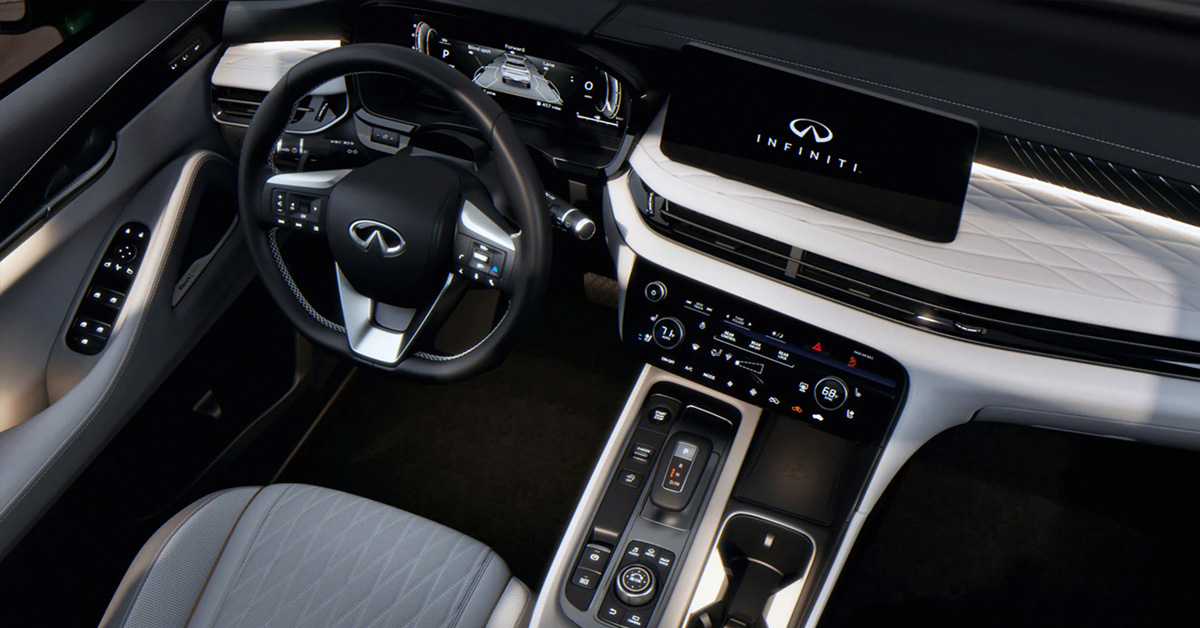
The 2026 QX60 features a Smart Rearview Mirror that lets drivers toggle between a standard reflective view and a high-definition camera feed. This technology provides a clear, unobstructed view behind the vehicle, even when passengers or cargo block the rear window. Adjustable settings for brightness, rotation, and dimming make it easy to customize the display for optimal visibility in any driving condition.
At INFINITI of Ontario, we are dedicated to helping drivers get the most out of their vehicles. Our team is here to assist with sales, service, parts, and expert guidance for every automotive need. Contact us today or visit our dealership to learn more about the QX60 and experience the convenience and safety of the Smart Rearview Mirror.
How Does the Smart Rearview Mirror Work in the 2026 QX60?
The Smart Rearview Mirror in the 2026 QX60 provides drivers with two ways to see behind the vehicle. It can function as a standard reflective mirror or display a high-definition feed from a rear-mounted camera. Knowing how to use INFINITI Smart Rearview Mirror helps improve visibility, especially when passengers or cargo block the rear window. Key features of the QX60 Smart Rearview Mirror include:
- Toggle Modes: A small flip switch at the bottom of the mirror switches between standard mirror and camera view.
- Clear View: The camera shows a wide, unobstructed image of the area behind the vehicle.
- Adjustable Settings: Brightness, rotation, and dimming can be changed to match your preference.
- Automatic Saving: The mirror saves your settings so they are ready the next time you drive.
Understanding these functions helps drivers get the most out of the Smart Rearview Mirror. It improves safety and makes reversing or lane changes easier, even in challenging conditions.
How Do You Toggle Between Mirror and Camera Modes?
Toggling between the standard mirror and the digital camera view in the QX60 is simple and intuitive. Knowing how to use QX60 digital mirror settings ensures you always have the best view behind your vehicle. The system helps improve visibility, especially when the rear window is blocked. Steps to switch between modes:
- Locate the Flip Switch: Find the small switch at the bottom of the mirror.
- Move the Switch: Slide it to activate the camera display or return to the reflective mirror.
- Check the View: The digital mode shows a wide, clear image behind the vehicle.
- Switch Back as Needed: Return to the standard mirror for familiar, reflective viewing.
Using this feature correctly helps drivers maintain clear visibility and makes reversing, lane changes, and overall driving safer.
How Can You Adjust the Display for the Best View?
Adjusting the Smart Rearview Mirror in the QX60 helps ensure you have the clearest view behind your vehicle. Learning how to adjust camera mirror INFINITI settings lets you customize brightness, rotation, and other features for safe, comfortable driving. Steps to optimize the display:
- Access the Menu: Press the ‘Menu’ button on the bottom edge of the mirror to view settings.
- Adjust Brightness: Use the adjacent buttons to increase or decrease screen brightness for day or night driving.
- Rotate the Image: Slightly tilt the image up, down, left, or right for the best rear view.
- Save Settings Automatically: The mirror remembers your preferences for the next drive.
- Check Visibility: Ensure the view is clear, even with passengers or cargo blocking the rear window.
Properly adjusting the display improves visibility, reduces glare, and helps drivers confidently manage their surroundings at all times.
What Should You Know About Camera Clarity and Obstructions?
When you turn on Smart Rearview Mirror in the QX60, the camera provides a clear view behind the vehicle. However, certain conditions can affect clarity, so it’s important to know how obstructions impact the display. Key points about camera clarity and obstructions:
- Rear Dirt or Debris: Rain, snow, or mud can block the camera lens and reduce visibility.
- Switch to Standard Mirror: Use the reflective mirror if the camera view is obscured.
- Clean the Lens Regularly: Wiping the rear camera helps maintain a clear image at all times.
- Passenger or Cargo Obstructions: The camera view improves visibility past people or items in the back seat.
- Lighting Effects: Headlights from cars behind may flicker on the screen, which is normal.
Understanding these factors helps drivers maintain a clear rear view, improving safety and confidence while driving or parking.
How Do LED Headlights and Other Lights Affect the Mirror Display?
The QX60 rear camera mirror location is designed to provide a wide, clear view behind the vehicle. However, bright lights from other cars can sometimes affect how the display looks. Understanding these effects helps you use the mirror safely at night or in low-light conditions. How lights can impact the display:
- LED Headlights: Oncoming or following LED lights may appear to flicker on the screen, which is normal.
- Streetlights and Signs: Bright lights can create temporary glare, reducing visibility until adjusted.
- Camera Lens Reflection: Light hitting the rear camera lens may reflect slightly, affecting clarity.
- Adjust Brightness: Use the mirror’s brightness settings to improve visibility in bright or dark conditions.
- Check Mirror Position: Ensure the QX60 rear camera mirror location is unobstructed for best results.
Being aware of how lights interact with the camera display ensures safer driving and better use of the Smart Rearview Mirror.
Are There Safety Considerations When Using the Smart Rearview Mirror?
Using the Smart Rearview Mirror in the QX60 improves visibility, but it is important to understand safety considerations. Knowing how to use INFINITI Smart Rearview Mirror correctly helps prevent distractions and ensures safe driving. Key safety points to remember:
- Do Not Rely Solely on the Camera: Always check mirrors and blind spots in addition to the digital display.
- Adjust Before Driving: Set brightness, rotation, and angle before moving the vehicle to avoid distractions.
- Watch for Obstructions: Dirt, snow, or cargo can reduce camera clarity; switch to the standard mirror if needed.
- Limit Interaction While Driving: Avoid pressing buttons or changing settings while the vehicle is in motion.
- Follow Owner’s Manual: Review all safety guidelines and system limitations for proper use.
Following these safety tips ensures the Smart Rearview Mirror enhances visibility without creating risks, helping drivers stay aware of their surroundings.
How Can Drivers Make the Most of the Smart Rearview Mirror Daily?
Drivers can get the most from the Smart Rearview Mirror in the QX60 by using its features effectively every day. Understanding the QX60 digital mirror settings helps maintain clear visibility and a safe driving experience. Tips for daily use:
- Set Preferences First: Adjust brightness, rotation, and dimming before starting your drive.
- Switch Modes When Needed: Use the digital view to see past passengers or cargo and the reflective view for normal driving.
- Keep the Camera Clean: Wipe the rear camera lens regularly to prevent dirt or water from reducing clarity.
- Check Surroundings: Always glance at blind spots and mirrors, even when the camera is active.
- Save Settings: The mirror remembers your preferences, so daily driving is convenient and consistent.
Following these steps ensures the Smart Rearview Mirror provides optimal visibility and safety every time you drive the QX60.
Where Can Drivers Learn More About the QX60 Technology and Features?
Drivers who want to get the most from their QX60 can learn more about its technology and features through several helpful resources. Understanding how to adjust camera mirror INFINITI settings is just one way to improve safety and convenience while driving. Ways to learn more:
- Owner’s Manual: Provides detailed instructions on operating the Smart Rearview Mirror and other features.
- Dealership Guidance: INFINITI of Ontario staff can demonstrate how to use settings and answer questions.
- Certified Service Centers: Experts can show hands-on how to adjust and maintain the camera and mirror system.
- Manufacturer Resources: INFINITI websites and support pages offer guides and tips for QX60 technology.
- Online Videos and Tutorials: Reliable sources can show step-by-step instructions for adjusting the mirror and other features.
Using these resources ensures drivers fully understand their QX60, stay safe, and get the most from the vehicle’s advanced technology.
Frequently Asked Questions About the QX60 Smart Rearview Mirror
Drivers often have questions about using the Smart Rearview Mirror in the QX60, especially for everyday driving and safety. Knowing the answers ensures proper use and clear visibility at all times.
How do I switch between the standard mirror and the digital camera view?
Use the flip switch on the mirror’s base to toggle between the normal reflective view and the digital camera display.
How do I adjust the brightness and angle of the digital display?
Press the Menu button on the mirror, then use the adjustment buttons to change brightness and rotate the view.
What should I do if the image in the smart rearview mirror is blurry?
Check for dirt, water, or obstructions on the rear camera lens and clean it if needed.
Where is the camera lens for the rear-view mirror located?
The camera lens is mounted on the rear of the QX60, near the back window, for a clear view behind the vehicle.
Does the smart rearview mirror work well at night or in the rain?
Yes, but bright lights may flicker on the screen and rain or dirt can reduce clarity, so keep the lens clean and switch to the standard mirror if needed. These answers help drivers use the QX60’s Smart Rearview Mirror effectively, improving safety, visibility, and convenience during daily driving.
Learn More About INFINITI Vehicles and QX60 Features
Enhance your daily drives with the QX60 and other INFINITI models at Infiniti of Ontario, serving Rancho Cucamonga, Chino Hills, and Upland. Our team is ready to help you find the right SUV and answer questions about features or performance.
If you want to keep your vehicle safe and reliable, learning about 2026 INFINITI QX80: Must-Have Safety Features for Family Drivers can show you which tech helps protect passengers. You can also review Which INFINITI Models Come with AWD?[2026] to see all INFINITI SUVs and sedans equipped with all-wheel drive. You can also compare models like the 2025 INFINITI QX80 Autograph vs. Nissan Armada Platinum Reserve to see which SUV fits your needs best.
Contact Infiniti of Ontario today or visit us to view our full inventory and experience our expert service.
Get Directions to Infiniti of Ontario
Disclaimer: All information is provided for general informational and entertainment purposes only. While we strive for accuracy, we cannot guarantee that all content is complete, current, or error-free. Any reliance you place on such information is strictly at your own risk. This article may include opinions and is not endorsed by, or officially affiliated with, any vehicle manufacturer or brand. Always consult official sources – such as the vehicle’s owner’s manual, authorized dealerships, or certified professionals – for the most up-to-date and personalized information.
Connect with us


- June 2026
- May 2026
- February 2026
- January 2026
- December 2025
- November 2025
- October 2025
- September 2025
- August 2025
- July 2025
- June 2025
- May 2025
- April 2025
- March 2025
- January 2025
- December 2024
- November 2024
- October 2024
- September 2024
- August 2024
- July 2024
- June 2024
- May 2024
- April 2024
- March 2024
- February 2024
- January 2024