Something extraordinary is unfolding

Limited time offer count down timer

The 2026 INFINITI QX60 offers a versatile lineup of trims designed to meet a variety of driving needs. From the well-equipped PURE base model to the luxurious AUTOGRAPH, each configuration provides advanced technology, comfort, and performance features. With standard connectivity through Google built-in, wireless Apple CarPlay®, and Android Auto™, plus INFINITI Premium Care benefits including oil changes, tire rotations, and roadside assistance, the QX60 ensures a premium ownership experience for drivers in Ontario, CA.

Explore the 2026 INFINITI QX60: Trims, Features, and Premium Ownership Benefits

PURE: The Starting Point 

The PURE trim serves as the base model for the 2026 INFINITI QX60. It includes a 2.0 L 4-cylinder engine. This engine produces 268 hp and 286 lb-ft of torque. Standard technology features include Google built-in integration, wireless Apple CarPlay® integration, and wireless Android Auto™. A panoramic moonroof is also standard equipment on this model. 

Read the rest of this entry »

The braking system is a primary safety feature for your vehicle, and Infiniti of Ontario in Ontario, CA, suggests that understanding basic maintenance helps prevent future issues. The system consists of several parts that function together to brake, or slow and stop the vehicle. 

Brake Components FAQ: Everything You Need to Know About Your Vehicle's Brakes

Main Brake Components 

The braking system includes brake pads, rotors, calipers, lines, and the master cylinder. Each component performs a specific function, and wear on one part can affect the performance of the entire system. 

Read the rest of this entry »

Luxury vehicles are often judged by the things you can see and touch. The leather. The switchgear. The way the cabin is assembled. Increasingly, however, the ownership experience extends beyond the vehicle itself. A modern luxury vehicle is expected to remain connected to its owner long after the drive is over. It should provide information when needed, assistance when requested, and convenience without demanding constant attention. INFINITI InTouch was developed with precisely that goal in mind. 
What Is INFINITI InTouch? The Technology That Makes Ownership Easier 

A Connected Platform Rather Than a Single Feature 

The easiest way to think about INFINITI InTouch is as a digital extension of the vehicle. The platform links compatible INFINITI models with a range of connected services that can be accessed both from inside the vehicle and remotely through a smartphone. New INFINITI vehicles include three years of InTouch services, allowing owners to explore the platform’s capabilities from the beginning of their ownership experience. 

Read the rest of this entry »

Why do cars need oil changes? Good vehicle design often comes down to protecting critical components from forces the driver never sees. Inside your INFINITI’s engine, pistons travel thousands of times per minute. Camshafts open and close valves with remarkable precision. Bearings support rotating assemblies under tremendous loads. All of these components rely on a remarkably thin layer of oil to operate smoothly. 

Why Oil Changes Are Essential for Your INFINITI 

It is easy to overlook engine oil because it does its work out of sight. Yet few maintenance items have a greater impact on long-term vehicle health. 

Oil Does More Than Lubricate 

Most drivers understand that oil reduces friction, but that is only part of the story. Engine oil also helps manage heat by carrying it away from internal components. It suspends microscopic contaminants generated during combustion and normal engine operation, allowing the oil filter to capture them before they circulate further through the engine. 

Read the rest of this entry »

The 2026 INFINITI QX80 gives Ontario, CA drivers a full-size luxury SUV with commanding performance, three-row comfort, and advanced technology. Available at INFINITI of Ontario, this SUV is built for families and drivers who want strong towing ability, premium cabin features, and confident daily capability. Contact our team to learn more about current QX80 availability, features, and trim options.

The 2026 INFINITI QX80 Redefines What a Luxury SUV Can Be 

Fresh Features for the 2026 Model 

The 2026 INFINITI QX80 includes an Adjustable Height Air Suspension system. This feature lowers the vehicle when the driver shifts into park to help passengers enter and exit the cabin. The exterior uses flush door handles that extend automatically when a person approaches. An ambient lighting system with 64 colors is available to change the look of the dashboard and door panels. 

Engine Performance and Specifications 

A twin-turbocharged 3.5 L V6 engine provides power for the 2026 INFINITI QX80. This engine produces 450 hp and 516 lb-ft of torque. The vehicle uses a 9-speed automatic transmission to manage gear shifts. Drivers can select the available All-Mode 4WD system for improved traction on different road surfaces. Invisible Hood View technology and a Front Wide View camera provide a 180-degree field of vision to assist with parking. 

Towing with the 2026 INFINITI QX80

The 2026 INFINITI QX80 has a maximum towing capacity of 8500 lbs. It is capable of pulling trailers, boats, or other heavy equipment. The air suspension system helps keep the vehicle level during towing tasks. The interior provides up to 101 cubic feet of total cargo space when the rear seats are folded. The adjustable suspension can lower the rear of the vehicle to make loading cargo easier. 

Interior Features and Technology 

The cabin of the QX80 seats up to 8 people. The dashboard features a 14.3″ touchscreen for the INFINITI InTouch system. This system includes Apple CarPlay© and Android Auto© for smartphone integration. A Klipsch premium audio system is available to provide high quality sound throughout the three rows of seats. The interior uses premium materials and specific stitching patterns on the seats. 

2026 INFINITI QX80 Trims

The 2026 INFINITI QX80 is sold in 4 trim levels. These trims are Pure, Luxe, Sensory, and Autograph. The Pure trim features 20″ wheels and the 14.3″ display. The Luxe trim includes 22″ wheels and a head-up display. The Sensory trim adds semi-aniline leather seats and specialized lighting. The Autograph trim is the highest level and includes a front seat massage function and 2nd row captain’s chairs. 

The 2026 INFINITI QX80 brings full-size SUV capability, advanced technology, and refined three-row comfort together in one powerful package. If you are ready to compare trims, review towing features, or explore current availability, visit INFINITI of Ontario in Ontario, CA. Our team can help you find the QX80 configuration that fits your driving needs, family routine, and preferred features.

The 2026 INFINITI QX60 is a luxury SUV available at INFINITI of Ontario in Ontario, CA. This 3-row vehicle is designed for families who need a balance of style and daily use. If you are driving to school in Ontario, CA, or going on a long trip, the QX60 provides a quiet and organized cabin for up to 7 passengers. Please contact our team to learn more about this model. 

The 2026 INFINITI QX60: A Luxury 3-Row SUV Built Around Your Life 

Technology Features in the 2026 INFINITI QX60 

The 2026 INFINITI QX60 includes Google built-in© technology. This system provides easy access to Google Maps© and Google Assistant© through the 12.3″ interactive touchscreen. Wireless Apple CarPlay© and wireless Android Auto© are standard features on every trim. These tools allow for an easy connection to mobile apps and navigation.  

The INFINITI InTouch service package is included for 3 years. This service offers remote access and map updates. A 10.8″ Head-Up Display is also available to show speed and safety alerts on the windshield.  

Driving Performance and Capability 

The 2026 INFINITI QX60 uses a 2.0 L VC-Turbo 4-cylinder engine. This engine produces 268 hp and 286 lb-ft of torque. It uses variable compression technology to change how the engine works based on driving needs. A 9-speed automatic transmission is standard.  

This SUV can tow up to 6000 lbs when equipped with the proper tow package. Drivers can choose between front-wheel drive or intelligent all-wheel drive. The 20″ wheels are standard across all trim levels to provide a stable ride.  

Interior Design and Comfort 

The cabin has 3 rows of seats. The PURE and LUXE trims have seating for 7 people. The SPORT and AUTOGRAPH trims include 2nd-row captain’s chairs, which changes the seating to 6 people. Available features include semi-aniline leather seats and open pore Ash wood trim.  

Climate-controlled front seats are available on the LUXE trim and higher. The AUTOGRAPH trim offers massaging front seats for more comfort during long drives. A panoramic moonroof is a standard feature on every 2026 INFINITI QX60.  

2026 INFINITI QX60 Trim Levels 

The 2026 INFINITI QX60 comes in 4 trims: PURE, LUXE, SPORT, and AUTOGRAPH. The PURE trim has the 2.0 L engine, 12.3″ screen, and a 9-speaker audio system. The LUXE trim adds a 16-speaker Klipsch© audio system and a 3D Around View Monitor.  

The SPORT trim is new for the 2026 model year. It features 20″ gloss black wheels, a black grille, and Dusk Blue seating. The AUTOGRAPH trim is the top model. It has a 20-speaker Klipsch© audio system, a 2-tone exterior, and quilted leather seats.  

Visit INFINITI of Ontario to experience the 2026 INFINITI QX60 and compare the PURE, LUXE, SPORT, and AUTOGRAPH trims in person. Our team can help you review available features, current inventory, seating options, and performance details so you can choose the QX60 that fits your daily drives and family needs in Ontario, CA.

Drivers in Ontario, CA, can maintain their luxury vehicles by visiting Infiniti of Ontario. It is important to know if replacement parts come from the factory. Using original parts is one of the best ways to ensure long-term vehicle health and safety. You should contact our team today to learn about the components available for your specific model. 

Why Genuine INFINITI Parts Make a Difference for Your Vehicle 

What Are Genuine INFINITI Parts and Why They Matter 

Genuine parts are components designed and tested by the manufacturer. These parts are not generic substitutes, and they are engineered to work with specific vehicle systems. INFINITI creates vehicles with precise measurements. When a person replaces a part with an original component, the fit is correct. This ensures the part does not interfere with other systems. Using these parts also protects the warranty. If a non-approved part causes damage, the repair might not be covered. 

Read the rest of this entry »

If you need a luxury car that stays on the road for years, INFINITI of Ontario in Ontario, CA has many options. People often ask if INFINITI vehicles are reliable. These cars use Japanese engineering to provide a long service life. The brand builds cars on strong platforms that focus on mechanical durability. 

Are INFINITIs Reliable? What You Should Know Before You Buy

Why INFINITI Models Are Built to Last 

Engineers use quality parts and precise measurements to build these vehicles. Many models use the 2.0 L VC-Turbo 4-cylinder engine. This engine produces 268 hp and 286 lb-ft of torque in the QX60. The QX80 features a 3.5 L twin-turbo V6 engine. This larger engine provides 450 hp and 516 lb-ft of torque. These components allow the cars to handle daily driving conditions in Ontario, CA.  

The Life Span of INFINITI Vehicles 

Many owners report that their vehicles reach 150,000 to 200,000 miles. Success depends on regular service. Owners should change the oil on a set schedule. The INFINITI Premium Care program covers certain maintenance tasks for the first 3 years. This program helps owners keep their cars in good condition from the start. 

Technology and Ownership Features 

The cabin includes electronics that meet luxury standards. Most models include a 12.3″ or 14.3″ touchscreen. These systems support wireless Apple CarPlay® and wireless Android Auto®. Drivers can use the MyINFINITI app to monitor the status of the car. Learning how to use these systems helps keep the vehicle running correctly.  

Maintenance and Parts for Reliability 

A reliable car requires consistent care. Owners must use the correct oil type and official parts. Brake pads and fluid levels also need regular checks. Following the maintenance schedule helps a car last well past 100,000 miles. 

Advanced INFINITI Technology 

INFINITI cars are well-made and provide strong performance. They use advanced technology and durable parts to serve drivers for many years. If you want to see the new models, visit INFINITI of Ontario in Ontario, CA today.

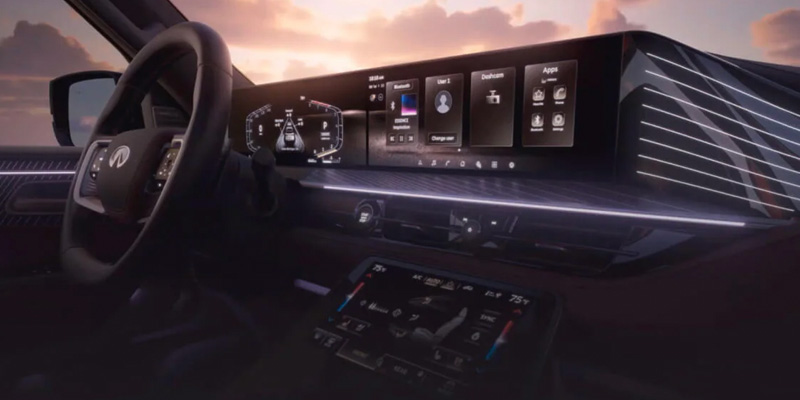
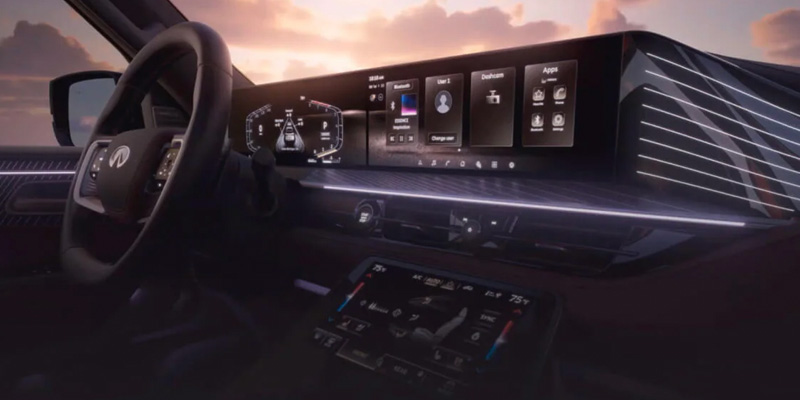
The interior of the INFINITI QX60 showing the steering wheel and infotainment system

Updating your INFINITI’s InTouch software in 2026 is simple and accessible for drivers, whether using automatic over-the-air updates or performing a manual check through the system menu. By connecting your vehicle to WiFi and following a few guided prompts, you can keep your QX60, QX80, and other INFINITI models running their best with the latest firmware, maps, and in-vehicle apps. Staying current ensures smoother performance, improved navigation, and a more connected driving experience.

Infiniti of Ontario is committed to helping drivers enjoy every mile with dependable support for sales, service, parts, and technology questions. Our team is ready to assist if you ever need guidance with your InTouch system or any aspect of vehicle ownership. Contact us or visit today to experience dedicated care from a dealership that puts your needs first.

What Steps Should You Follow When Your INFINITI Receives an Automatic Update Prompt?

Automatic updates are one of the easiest ways to keep your system current, especially if your vehicle is already connected to WiFi. When an over-the-air update becomes available, your INFINITI will let you know with a clear notification on the center display. For many drivers, especially QX60 owners, these prompts are a reassuring reminder that the vehicle is working quietly in the background to stay up to date.

Recognizing the update notification

The prompt usually appears shortly after the system detects new software. You might see it when you start your engine in the morning or in the evening when you pull into the driveway. The message is simple and usually includes two choices: start now or postpone. Drivers often appreciate this because it feels similar to receiving an update alert on a phone or tablet. You are still in control of the timing, and nothing happens without your approval.

Steps to follow when the prompt appears

Once the message appears, the process is straightforward. Most drivers complete it in a few seconds. Here are the typical steps:

  • Review the notification so you know an update is available.
  • Select yes if you want the installation to begin immediately.
  • If you prefer to wait, choose the option to install later.
  • If you choose to install now, keep the vehicle parked and allow the system to complete the process.

On newer models such as the QX60, there may be an additional option that appears after you turn the vehicle off. This lets the update finish in the background while you go inside, so you do not have to wait in the cabin.

Why it helps to approve updates promptly

Automatic updates typically include small refinements that improve day-to-day use. When these roll out, installing them promptly can help you enjoy:

  • Smoother menu transitions
  • More accurate navigation behavior
  • Stronger wireless connectivity
  • Reduced instances of slow loading or temporary screen freezes

These improvements happen quietly, but they make a noticeable difference for anyone who relies on their system throughout the week.

Let the system work for you

Think of these prompts as routine maintenance for your technology. Just as you would accept updates on your home devices, letting your INFINITI install them keeps everything running efficiently. The best part is that the system handles the technical details so you can simply confirm the update and carry on with your day.

Need help with an update prompt?

If a notification appears and you are not sure how to respond, Infiniti of Ontario is ready to assist. Our team can walk you through what is on your screen, explain the update, or take a quick look at your system to confirm everything is functioning correctly.

How Do Over-the-Air Updates Work on INFINITI Models Like the QX60?

Over-the-air updates make it easy for drivers to keep their systems current without connecting to external devices or visiting a dealership for basic software refreshes. The process feels natural because the vehicle handles most of the work behind the scenes. For many owners, especially those driving a QX60, this feature has become one of the most appreciated conveniences in modern automotive technology.

A simple process that works in the background

When your vehicle is connected to a stable WiFi network, it quietly checks for new software. If you often park within range of your home’s internet, the system may discover updates as soon as they are released. Many drivers refer to this setup as the QX60 software update WiFi method because it allows the SUV to manage its technology much like a smartphone or tablet.

Once an update becomes available, you will typically see a notification on the center screen. From there, installation is straightforward. Here is what you can expect:

  • Your vehicle verifies the update and downloads the files using WiFi.
  • A prompt appears to let you know installation is ready.
  • You choose whether to start the installation immediately or wait until a more convenient time.

Nothing needs to be plugged in. Nothing needs to be synced. The entire process is designed to fit naturally into everyday use.

Automatic updates designed for real life

One of the most helpful features is the ability for the system to install updates after you turn the engine off. Imagine pulling into the garage after a long day. Instead of interrupting your evening, you simply approve the installation, step out of the vehicle, and let it finish on its own.

The next time you start the QX60, the software is ready to go. This flexibility is a major benefit for families and commuters who do not want to sit and wait during installation. It gives you more control over when updates occur and reduces the chance of missing out on useful improvements.

What these updates typically improve

Over-the-air updates can enhance several parts of your driving experience, including:

  • Interface performance, which helps menus load more quickly
  • Navigation accuracy, especially in growing or high-traffic areas
  • Connection reliability for Bluetooth and wireless features
  • Stability for apps and services that rely on the cloud

Drivers often notice that simple everyday tasks, such as pulling up directions or switching between screens, feel smoother after an update.

Support whenever you need it

Although most drivers find the process intuitive, Infiniti of Ontario is always available if a question comes up or if you want someone to look over your system in person. Our team can help you confirm your vehicle is properly connected to WiFi, walk you through the steps, or offer guidance if you are unsure whether an update was installed successfully.

If you prefer professional assistance or simply like the peace of mind that comes with expert support, reach out or visit our dealership. We are here to help you get the most from your INFINITI every day.

How Do You Manually Check for System Updates on Your INFINITI?

While automatic updates handle most of the work, some drivers prefer to take a hands-on approach. Manually checking for new software is a simple way to stay confident that your system is running its latest version. This is especially helpful if you drive often, travel long distances, or rely heavily on features like navigation and smartphone integration. Owners of the QX60, in particular, appreciate having the option to check for system updates whenever it fits their schedule.

Why manual checks can be helpful

Some drivers like the reassurance of confirming updates themselves. Others may have limited WiFi access at home and prefer to perform updates when they reach a location with a stronger connection. Whatever the reason, the manual process is designed to be quick and intuitive. Common situations where a manual check makes sense:

  • You suspect an update might be available, but have not received a notification
  • A feature feels slower than usual, and you want to rule out pending software updates
  • You recently connected to a stronger WiFi network
  • You want to verify the system on a QX60 after a long trip or seasonal change

Step-by-step guide to checking for updates

The process requires only a few taps on the touchscreen. It is similar across most late-model INFINITI vehicles, including the QX60. Follow these steps:

  • Park your vehicle in a safe and well-ventilated spot.
  • Connect to a reliable 2.4 GHz WiFi network.
  • Press the Menu button on the center display.
  • Select Information from the list.
  • Choose System Information.
  • Tap Software Update.
  • Finally, select Start Software Update and then Check for Updates.

If new software is available, the system will guide you through the download and installation. Once complete, it is recommended to leave the vehicle off for several minutes so everything can settle properly. Drivers who frequently check for system updates on a QX60 often find that small refinements accumulate over time, creating a noticeably smoother and more responsive experience.

What to expect after installation

After a manual update, you may notice:

  • Faster screen transitions
  • Improved app stability
  • More accurate map behavior
  • Fewer connection hiccups

Nothing needs to be done on your end besides giving the system a few minutes to complete its internal reset.

How Can You Update Maps and In-Vehicle Apps on Your INFINITI?

Updating your maps and in-vehicle apps is just as important as keeping the main software current. These features support everyday driving, from finding the fastest route to accessing tools that make the cabin feel more personalized and intuitive. Many drivers notice that even small updates can make a QX60 feel more responsive, especially when navigating unfamiliar areas or switching between apps during a busy commute.

Why map and app updates matter

Modern INFINITI models rely heavily on real-time connectivity. Map updates help your system reflect new roads, construction zones, and local changes more accurately. App updates improve stability, fix glitches, and introduce refinements that help the infotainment interface feel polished. These improvements often occur quietly in the background, although they depend on having the right software and a current INFINITI firmware version to support them. Drivers tend to appreciate these updates most when:

  • They rely on navigation in growing neighborhoods
  • They take regular weekend trips into new areas
  • They use apps like the Digital Owner’s Manual or streaming services
  • They want the system to react quickly, even during peak travel hours

How to update maps on your INFINITI

On many 2026 models equipped with Google built in, map updates happen automatically through cloud services. This means the system pulls new data as soon as it is available, as long as the vehicle has a stable connection. For drivers who prefer manual updates, the process is simple:

  • Park your vehicle where it can connect to a strong WiFi network.
  • Open the Menu on the center display.
  • Select System Information.
  • Tap Map Update.
  • Choose Update by WiFi.
  • Follow any on-screen prompts until the process completes.

Manual updates can be helpful in situations where the maps feel out of sync, or you want to confirm everything is current before heading out on a long trip.

How to update in-vehicle apps

In-vehicle apps are refreshed through the Google Play Store, which is built directly into the infotainment system on newer models. This lets you update apps the same way you would on a smartphone. Steps include:

  • Open the Play Store from the home screen
  • Select your profile or the app menu
  • Tap Manage apps and device
  • Install available updates

These updates often improve performance and help apps load more quickly, especially after larger system updates.

What to expect after updating

After updating maps or apps, drivers often notice improvements such as:

  • More accurate traffic and route data
  • Faster app loading times
  • Improved voice recognition accuracy
  • Reduced lag when switching between features

These refinements contribute to a more enjoyable and dependable daily driving experience.

Help with map or app updates

If you ever feel unsure about your current INFINITI firmware version or want help navigating the update menus, Infiniti of Ontario is here to assist. Our team can review your system, confirm that everything is running its most recent version, and help you understand any new features that come with updated maps or apps.

Whether you prefer hands-on guidance or simply want reassurance that everything is working correctly, reach out or visit us. We are always ready to help you make the most of your INFINITI’s technology.

What Should You Do If Your InTouch Update Doesn’t Install Correctly?

Even though the update process is designed to be smooth, there are times when an installation may pause, fail to complete, or leave the system behaving differently than expected. This can happen for simple reasons, such as a weak WiFi signal or the vehicle being turned off too early. Drivers who search for guidance on how to update INFINITI InTouch often do so because they want to troubleshoot these rare situations without unnecessary stress. The good news is that most issues can be resolved quickly with a few practical steps.

1. Start with a simple reset

A soft reboot is often the easiest way to get the system back on track. When the screen feels sluggish or an app refuses to load, this quick reset can clear temporary glitches. Drivers often try this first because it is:

  • Fast
  • Non-technical
  • Effective for small software hiccups

After the reset, go back to the update menu and check whether the installation can continue.

2. Check your WiFi connection

Many incomplete updates happen because the signal disconnects mid-download. If your QX60 is parked at the edge of your home network, the connection may drop without you noticing. Try these steps to strengthen your connection:

  • Park closer to your router
  • Switch to a 2.4 GHz network if available
  • Restart your home WiFi to refresh the signal. Confirm that your network does not require a login screen

Once connected, return to the update menu and attempt the installation again.

3. Verify the update menu

If the system still feels unresponsive, go back to the software update settings. Occasionally, the system may show that the update is partially installed or pending. Look for:

  • A prompt asking you to retry A partially downloaded update
  • A new update that replaced the previous one

This helps you determine whether the installation failed or simply paused.

4. Try checking for updates again

Manual checks can often resolve odd behavior by prompting the system to restart the process. You can repeat the same steps you would normally use to check for updates, which gives the system another chance to locate and install the correct files. Many QX60 owners find that a fresh attempt completes without any issues.

When to ask for expert help

If the system freezes repeatedly, apps refuse to open, or you receive error messages you have never seen before, it may be time for professional support. Some issues are caused by deeper software conflicts that are best handled by trained technicians. Infiniti of Ontario can:

  • Review your system in person
  • Confirm whether the update was installed successfully
  • Reconnect or refresh the system using factory-level tools
  • Help you understand what caused the issue

Our team works with InTouch systems daily, which means we can identify problems quickly and get you back on the road with confidence.

How Often Should You Check for New InTouch Updates on Your INFINITI?

Many drivers wonder how frequently they should look for new software, maps, or app updates. The good news is that the system is designed to take much of the guesswork out of the process. If your vehicle regularly connects to a strong WiFi network, such as at home or work, it can automatically discover new updates through the same method often referred to as the QX60 software update WiFi approach. This allows your QX60 or QX80to stay current without constant attention.

General recommendations for most drivers

While automatic updates handle a large portion of the work, it is still wise to check manually from time to time. A quick manual check ensures you are not missing any refinements, especially if you use your vehicle’s technology heavily. Most drivers find this schedule helpful:

  • Once per month for general peace of mind
  • Before long road trips that rely on accurate navigation
  • After connecting to a better WiFi signal than usual
  • Anytime the system feels slower or different than normal

These occasional checks take only a few moments and can help prevent small issues from turning into frustrations.

How do I connect my 2026 QX60 to WiFi to perform an update?

To connect your QX60, park within range of a stable 2.4 GHz WiFi network, then go to Menu → Settings → WiFi or Network Settings on your InTouch screen. Select your network, enter the password if required, and confirm the connection.

Do I need to visit the dealership for an InTouch software update?

No, most updates can be performed at home using WiFi or over-the-air update functionality. Visiting the dealership is only necessary if the update fails, the system freezes, or professional troubleshooting is needed.

How long does an over-the-air software update usually take?

Updates typically take 15 to 30 minutes to download and install, depending on the size of the update and the strength of the WiFi connection.

Can I drive the vehicle while the software is updating?

No, the vehicle should remain parked during the update. For the QX60, you may be able to start the update after turning off the engine, so it completes while parked.

How do I check which software version my QX60 is currently running?

On the InTouch screen, go to Menu → Information → System Information → Software Version. The current firmware version will be displayed there.


Stay Connected & Enjoy All INFINITI Has to Offer at INFINITI of Ontario

Keeping your InTouch system up to date is just one way to ensure your QX60 performs at its best, but there are many other ways to enjoy your vehicle’s features and capabilities. From maintaining the luxurious semi-aniline leather seats to taking advantage of the smart rearview mirror, every detail contributes to a smoother, more comfortable, and more connected drive. A well-maintained and fully updated QX60 also makes the most of its innovative 4-cylinder VC-Turbo engine, delivering efficiency and performance for daily commutes or weekend getaways.

For drivers in Rancho Cucamonga, Chino Hills, and Upland, Infiniti of Ontario is your local resource for everything INFINITI. Whether you want help with technology, want to schedule a service, or are ready to see our wide selection of vehicles, including the QX60, our team is here to guide you every step of the way. Take a closer look at the luxurious leather care  tips for your QX60, learn how to maximize your Smart Rearview Mirror, or get the full guide to the QX60’s VC-Turbo engine to make the most of your drive. Contact us or stop by today to see how easy it is to enjoy all the technology, comfort, and performance your INFINITI has to offer.

Get Directions to Infiniti of Ontario


Disclaimer: All information is provided for general informational and entertainment purposes only. While we strive for accuracy, we cannot guarantee that all content is complete, current, or error-free. Any reliance you place on such information is strictly at your own risk. This article may include opinions and is not endorsed by, or officially affiliated with, any vehicle manufacturer or brand. Always consult official sources – such as the vehicle’s owner’s manual, authorized dealerships, or certified professionals – for the most up-to-date and personalized information.

A woman closing the liftgate of a 2026 INFINITI QX60

The 2026 INFINITI QX60 comes with a motion-activated liftgate designed for convenience, but there are times when you may want to stop the trunk from opening automatically. You can easily turn off the motion liftgate using your vehicle information display, the main power switch in the glove compartment, or the instrument panel switch. Step-by-step guidance will help you disable the Infiniti kick sensor, adjust QX60 liftgate settings, and regain control over your liftgate’s operation.

At Infiniti of Ontario, we are here to assist drivers in Rancho Cucamonga, Chino Hills, and Upland with all their automotive needs. From sales and service to parts and maintenance, our team is ready to provide expert support. Contact us today or visit us to learn more about your QX60, schedule service, or get personalized guidance for your vehicle.

What is the Motion-Activated Liftgate on the QX60, and Why Would You Want to Turn It Off?

The 2026 INFINITI QX60 features a motion-activated liftgate designed to make loading and unloading easier, especially when your hands are full. This system allows the trunk to open automatically with a simple foot gesture under the rear bumper or by pressing the liftgate button. While convenient, there are times when drivers may want to turn off the motion liftgate QX60 to prevent accidental openings, improve safety, or avoid unexpected operation in tight parking spaces.

Stopping the automatic function gives you complete control over when and how the liftgate opens. Whether you are navigating a busy garage in Rancho Cucamonga, managing groceries in Chino Hills, or parking in a crowded area of Upland, knowing how to adjust your QX60 liftgate settings can save frustration and protect your vehicle. Using the vehicle’s settings, the main power switch, or the instrument panel switch, you can quickly disable the motion sensor and enjoy a liftgate that operates only when you want it to.

How Can You Disable the INFINITI Kick Sensor on Your QX60?

The kick sensor on the QX60 makes it easy to open the liftgate without using your hands, which is perfect when carrying groceries or luggage. However, it can also trigger the liftgate unintentionally, especially in tight parking spaces or crowded areas in Rancho Cucamonga, Chino Hills, or Upland. Learning how to disable the Infiniti kick sensor gives you control over when the liftgate opens and prevents accidental activations.

Steps to disable the kick sensor through the vehicle settings:

  • Access the vehicle information display using the steering wheel controls.
  • Navigate to Settings, then select Vehicle Settings.
  • Locate the Liftgate or Convenience options menu.
  • Toggle the motion-activated liftgate or kick sensor option to OFF.

This method allows you to maintain other liftgate functions while stopping the automatic foot-gesture feature. It’s quick, safe, and reversible, so you can turn the sensor back on anytime if you prefer hands-free operation.

Why disabling the kick sensor is helpful:

  • Prevents the liftgate from opening accidentally in tight garages.
  • Reduces the risk of damage to the liftgate, cargo, or nearby objects.
  • Offers peace of mind when pets or small children are around.

If you want hands-on assistance or a walkthrough on adjusting your QX60’s liftgate settings, the team at Infiniti of Ontario can help. Our experts can show you how to disable the kick sensor safely and customize your liftgate so it works exactly how you want it. Contact us today or stop by for a personal demonstration and make your QX60 even more convenient to use.

Where Do You Find the QX60 Liftgate Settings in Your Vehicle Information Display?

The QX60 makes adjusting your liftgate simple once you know where to look. Whether you want to fine-tune the motion sensor or turn off automatic features, the QX60 liftgate settings are all accessible through the vehicle information display on the dashboard. This centralized menu puts control right at your fingertips, without needing to reach for the glove compartment or instrument panel switches.

How to access the liftgate settings:

  • Use the steering wheel controls to navigate the main menu on the vehicle information display.
  • Scroll to Settings, then select Vehicle Settings.
  • Find the Liftgate or Convenience options menu.
  • Adjust features like motion activation, auto-close, or the kick sensor according to your preferences.

These settings let you turn off motion liftgate QX60 features whenever you need, whether you’re carrying heavy items, parking in a tight garage in Rancho Cucamonga, or keeping your cargo area secure in Chino Hills or Upland. You can even fine-tune the liftgate for specific situations, like loading kids’ sports gear or groceries.  

How Does the Main Power Switch in the Glove Compartment Work to Stop the Liftgate?

The QX60 comes with a convenient main power switch located inside the glove compartment, giving you another way to control the liftgate. This switch allows you to stop the trunk from opening automatically without navigating through the vehicle information display or touching the liftgate buttons. It’s especially useful if you frequently park in tight garages, crowded lots, or areas where accidental openings could cause damage.

How to use the glove compartment switch:

  1. Open the glove compartment and locate the Power Liftgate Main Switch.
  2. Move the switch to the OFF position.
  3. Test the liftgate to ensure the motion sensor and automatic features are disabled.

Turning off the liftgate in this way doesn’t prevent you from opening it manually. You can still lift or lower the trunk using the physical button on the liftgate itself, providing full flexibility while eliminating accidental activations.

Why this method is practical:

  • Quick and accessible without scrolling through menus
  • Prevents accidental openings when carrying groceries, luggage, or pets
  • Helps protect your vehicle and nearby objects in tight spaces

For QX60 owners in Rancho Cucamonga, Chino Hills, and Upland, this simple adjustment can make daily use safer and less stressful. If you want a step-by-step demonstration, the team at Infiniti of Ontario is ready to help. Stop by or contact us today to learn how to use the glove compartment switch and customize your QX60 liftgate for your lifestyle.

Can the Instrument Panel Switch Turn off the QX60 Liftgate Too?

In addition to the glove compartment switch, many QX60 models feature a motion-activated liftgate switch directly on the instrument panel. This provides a quick and convenient way to disable the liftgate’s automatic features without reaching inside the trunk or scrolling through the vehicle display. When set to OFF, the liftgate responds only to manual operation, giving you full control in any situation.

How to use the instrument panel switch:

  • Locate the motion-activated liftgate switch on your QX60’s instrument panel.
  • Toggle the switch to the OFF position.
  • Test the liftgate to confirm the motion sensor and automatic buttons are disabled.

This switch is particularly useful for drivers who frequently encounter crowded parking areas in Rancho Cucamonga, Chino Hills, or Upland. It allows you to prevent accidental openings while still maintaining the convenience of manual liftgate operation when needed.

Benefits of using the instrument panel switch:

  • Quick access without opening the glove compartment
  • Easy to toggle on or off depending on your needs
  • Helps prevent damage to the liftgate or surrounding objects

What are Additional Tips to Manage Your QX60’s Liftgate Settings Safely?

Even after you turn off the motion liftgate QX60 features, there are a few practical tips that can help ensure safe and reliable operation. The liftgate is convenient, but it’s important to remain mindful of your surroundings, especially when maneuvering in garages, driveways, or crowded parking lots in Rancho Cucamonga, Chino Hills, or Upland.

Tips for safe liftgate management:

  1. Keep the area clear: Always check behind the vehicle before opening or closing the liftgate manually. This protects pets, children, and nearby objects.
  2. Inform other drivers: If multiple people use the QX60, make sure everyone knows how the liftgate settings work and where to access the power or motion switches.
  3. Test settings periodically: Occasionally, verify that the motion sensor remains disabled if you want full manual control.
  4. Use manual operation when needed: Even with motion features off, the liftgate can still be opened or closed using the physical button, offering both convenience and safety.

Following these simple practices ensures that your QX60’s liftgate functions exactly as you need while reducing the risk of accidents or damage.

Where Can You Get Official Instructions or Help with Your 2026 QX60 Liftgate

If you are unsure how to adjust or disable the Infiniti kick sensor, the best starting point is the QX60 Owner’s Manual. The manual provides clear, trim-specific instructions for:

  • Turning off the motion-activated liftgate completely
  • Adjusting settings through the vehicle information display
  • Using the main power switch in the glove compartment or the instrument panel

For drivers who prefer hands-on assistance, an authorized INFINITI retailer can walk you through the process. At Infiniti of Ontario, our team is ready to help with any questions about liftgate operation, settings adjustments, or other features of the 2026 QX60. Whether you want to learn how to turn off motion liftgate QX60 features for everyday convenience or ensure your vehicle operates safely around pets, children, or crowded spaces, we can guide you step by step.

Tips for getting the most out of your liftgate settings:

  • Confirm the motion sensor is disabled after adjusting the settings to prevent accidental activation.
  • Make sure all drivers in your household understand how to operate the liftgate manually. Check the glove compartment and instrument panel switches periodically, as these are quick ways to regain control if needed.

Contact Infiniti of Ontario today to schedule a walkthrough, get hands-on help, or have our experts adjust your QX60 liftgate settings for optimal convenience and safety.

Frequently Asked Questions About the QX60 Motion Liftgate

Drivers often have specific questions about the QX60’s motion-activated liftgate, especially when looking to control its automatic features for safety, convenience, or maintenance purposes. These answers provide clear guidance for common scenarios.

How do I temporarily disable the motion-activated liftgate for a car wash?

You can temporarily disable the liftgate by turning off the motion sensor through the vehicle information display or using the glove compartment power switch. This prevents the trunk from opening automatically during the car wash.

Is there a physical on/off switch for the power liftgate in the glove box?

Yes, the QX60 has a main power switch located inside the glove compartment that turns off the power liftgate, including the motion sensor and liftgate buttons.

Can I turn off the kick sensor through the InTouch infotainment menu?

Yes, the kick sensor can be disabled through the vehicle information display using the steering wheel controls by navigating to Settings → Vehicle Settings → Liftgate or Convenience options.

Why does my liftgate open when I walk past the rear bumper?

The liftgate opens automatically because the motion-activated kick sensor detects your foot under the rear bumper. This is a normal feature designed for hands-free operation.

Will the liftgate still work with the key fob if I disable the motion sensor?

Yes, disabling the motion sensor does not affect the liftgate buttons or key fob operation. You can still open and close the liftgate using the fob. These answers help QX60 owners quickly address common liftgate questions, ensuring safety and control in everyday use. For hands-on assistance or step-by-step guidance, the team at Infiniti of Ontario can provide demonstrations and help adjust your liftgate settings for your specific needs.


Get Expert Help and Explore the QX60 and Other INFINITI Models

Managing the liftgate settings on your QX60 is only one part of getting the most out of your vehicle. Many drivers who explore these features also compare models or research capability across the INFINITI lineup. If you want to understand how this SUV stacks up against others, you can take a look at QX80 Autograph versus LX600 or review Autograph vs. Escalade Sport Platinum comparison for a closer look at two popular full-size competitors. Drivers who are interested in traction and seasonal performance can also explore INFINITI AWD model guide to see which vehicles offer the confidence of All Wheel Drive.

At Infiniti of Ontario, we’re here to help with everything from vehicle selection to service, parts, and maintenance. Stop by to see our wide inventory of SUVs, including the QX60, and experience firsthand the features and performance that set INFINITI apart. Our team can also provide personalized guidance on liftgate settings, all-wheel-drive options, and more. Contact us today or visit our dealership to get expert assistance and find the perfect INFINITI for your needs.

Get Directions to Infiniti of Ontario


Disclaimer: All information is provided for general informational and entertainment purposes only. While we strive for accuracy, we cannot guarantee that all content is complete, current, or error-free. Any reliance you place on such information is strictly at your own risk. This article may include opinions and is not endorsed by, or officially affiliated with, any vehicle manufacturer or brand. Always consult official sources – such as the vehicle’s owner’s manual, authorized dealerships, or certified professionals – for the most up-to-date and personalized information.