

Something extraordinary is unfolding
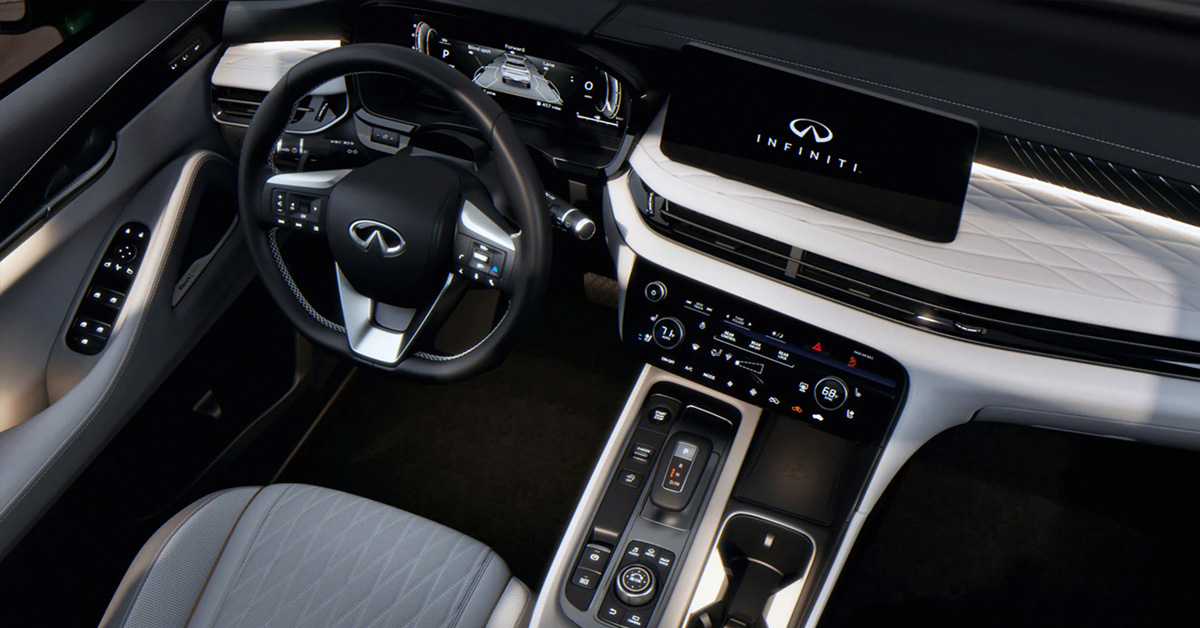
The 2026 INFINITI QX60 makes it easy to stay informed on the road with its 10.8-inch Head-Up Display that projects key speed, navigation, and safety data directly onto the windshield. By using the dedicated HUD button and the adjustable settings in the instrument panel, drivers can quickly customize brightness, height, and display content for clear visibility in any driving condition. The system is designed to help you keep your eyes on the road while still giving you access to the information you rely on every day.
Infiniti of Ontario is here to support you with everything from learning new technology to finding the right INFINITI for your lifestyle. Our team is dedicated to providing sales, service, and parts, and we are always ready to answer your questions. Contact us today to experience dedicated care and expert guidance.
Where Can You Locate the Head-Up Display Controls in the QX60?
Finding the controls for the Head Up Display in the QX60 is simple, and once you know where everything is, adjusting the system becomes second nature. INFINITI designed the layout so drivers can make quick changes without hunting through layers of menus. This is especially helpful during busy commutes or when multiple drivers use the same vehicle and need to reposition the display.
Easy Access to the HUD Button
The primary HUD control is placed to the left of the steering wheel on the lower portion of the instrument panel. It is a physical button that allows you to turn the display on or off instantly. Many drivers appreciate having a dedicated control that does not require navigating screens, particularly when setting up the feature for the first time. A quick tap of this button gives you immediate access to the system. This is convenient when:
- You prefer to drive without the display during nighttime trips.
- You want to adjust the position or brightness while parked.
- A different driver needs to recalibrate the display for their seating height.
Navigating the Display Settings
For deeper customization, the QX60 uses steering wheel controls that allow drivers to move through the settings menu on the instrument cluster. Within the menu, you will find options to change brightness, height, and the specific information that appears on the windshield. This layout reduces distraction since your hands stay close to the wheel and your eyes remain near your driving line. The steps are straightforward:
- Use the left side of the steering wheel toggles.
- Navigate to the settings screen.
- Look for the Head Up Display section.
- Adjust according to your preference.
Explore These Features in Person
To see how easy it is to manage these settings, visit Infiniti of Ontario for a hands-on walkthrough. Our team can show you exactly where each control is located and help you tailor the HUD to your driving habits. Reach out anytime to schedule a demonstration inside a QX60 and discover how simple and practical these features can be.
How Do You Turn the QX60 Head-Up Display On or Off?
Turning the Head Up Display on or off in the QX60 is one of the simplest parts of using the feature. INFINITI designed the controls so drivers can enable or disable the projection with almost no effort. Whether you prefer a clean windshield during certain drives or want the full experience of a modern windshield projection car, switching modes is quick and intuitive.
Quick Access With a Single Button
The fastest way to control the display is through the dedicated HUD button found on the lower left side of the instrument panel. This button gives you instant control even before you dive into the settings menu. A single press will:
- Turn the projection on when you want navigation or speed information front and center.
- Turn it off when you prefer a clear windshield, such as during nighttime driving.
Many drivers in areas like Chino Hills and Rancho Cucamonga appreciate how simple this is, especially when toggling the feature during changing road or lighting conditions.
Using the Settings Menu for Confirmation
In addition to the physical button, the digital menu in the instrument cluster also shows whether the HUD is active. You can confirm the status or toggle it by navigating with the steering wheel controls. The process is easy to follow:
- Use the left side toggles on the steering wheel.
- Move through the menu until you reach the settings screen.
- Select the Head Up Display option.
- Turn the feature on or off or adjust related settings as needed.
This comes in handy when setting up the vehicle for the first time or making adjustments for multiple drivers.
How Can You Adjust Brightness and Position for the Best Visibility?
One of the advantages of the 10.8 inch HUD INFINITI system in the QX60 is how easily it adapts to different drivers, lighting conditions, and seating positions. The projection is designed to feel natural, but fine tuning the brightness and height can make the display even clearer. Taking a moment to adjust these settings ensures you get the full benefit of the system, especially when driving through bright Inland Empire afternoons or shaded neighborhood streets.
Simple Adjustments Through the Settings Menu
To personalize the display, you will use the steering wheel controls to access the settings menu in the instrument cluster. Once inside, the Head Up Display section gives you full control over brightness and vertical placement. These options help you create a display that feels aligned with your eyes instead of forcing you to adapt to it. Within this menu, you can adjust:
- Brightness to match daylight, overcast skies, or nighttime driving.
- Vertical position to align the projection to your exact eye level.
- Display content if you want more or fewer items shown on the windshield.
Fine-Tuning the Position for a Better Fit
Everyone sits differently in a vehicle, and seating posture changes depending on height and personal preference. That is why the HUD position setting is so important. A correctly aligned display should sit naturally within your line of sight without forcing you to look up or down. Many drivers notice that:
- A higher position works well for taller drivers.
- A lower position feels more natural for shorter drivers.
- Centering the HUD prevents eye fatigue during long drives.
Taking a moment to adjust this before you pull out of your driveway in Rancho Cucamonga or Chino Hills can make the rest of the trip feel smoother.
Best Practice: Adjust While Parked
The ideal time to set these preferences is when the vehicle is in park. By adjusting everything before you start driving, you avoid unnecessary distractions and get a clearer sense of how the projection will appear under your current lighting conditions.
Which Types of Information Can You Customize in the QX60 HUD?
The 2026 QX60 head-up display gives drivers the freedom to choose exactly what appears on the windshield, making the system feel personal and purposeful instead of overwhelming. By tailoring the information to match your driving habits, you can focus on the details that matter most during commutes, weekend travel, or everyday errands around the Inland Empire.
A Display Built Around Your Needs
The HUD in the QX60 is designed to keep your eyes on the road while relaying important information through a clean, easy-to-read projection. Instead of cluttering the view with unnecessary details, INFINITI gives you the option to turn specific features on or off. This flexibility helps the system blend seamlessly into your driving routine. Here are some of the items you can customize within the HUD menu:
- Vehicle speed, useful when navigating changing speed zones or busy school areas.
- Navigation guidance, including turn-by-turn directions and lane recommendations.
- Driver assistance alerts, such as cues from safety systems when they detect changes around your vehicle.
- Audio or navigation prompts pulled through connected smartphone apps.
Why Customization Improves the Driving Experience
Everyone uses their vehicle differently, which is why customization matters. A driver regularly heading through Rancho Cucamonga may rely heavily on navigation prompts, while someone commuting from Upland might find speed and safety alerts more valuable. The ability to choose what appears on the windshield allows the system to enhance your awareness rather than distract from it. For example, consider:
- Turning on navigation when exploring new neighborhoods.
- Reducing displayed items during familiar, low traffic routes.
- Keeping driver assistance alerts active for freeway merging or high-speed travel.
- These small adjustments help the projection feel like a natural part of the road ahead.
How Does the HUD Integrate With QX60 Autograph Tech and Driver Assistance Systems?
One of the things that makes the HUD in the QX60 feel so advanced is how seamlessly it connects with the vehicle’s broader technology suite. Rather than functioning as a separate feature, the HUD works in harmony with the Autograph trim’s enhancements and the full range of driver assistance systems. This creates an experience where information appears exactly when you need it, without adding clutter or confusion.
A Unified System That Works Behind the Scenes
The strength of INFINITI HUD features lies in their ability to pull data from multiple sources throughout the vehicle and display only what is relevant. The projection becomes a central hub for real-time information, gathering inputs from safety sensors, cameras, and navigation tools. Drivers may see details such as:
- Alerts from lane-keeping and blind spot systems.
- Distance warnings when traffic slows ahead.
- Steering or speed cues from driver assistance features.
- Navigation turns paired with lane guidance.
All of this happens automatically, allowing you to stay focused on the road while still having immediate access to critical information.
Autograph Trim Enhancements That Elevate the Experience
The Autograph trim brings a more refined and connected feel to the cabin. With upgraded interior materials and expanded technology offerings, the integration with the HUD feels even smoother. Each system communicates effortlessly, which gives the projection a polished, confident quality. Drivers often notice that the Autograph environment makes the HUD feel like a natural extension of the vehicle’s premium design. The visuals appear crisp, and the communication between features is quick and intuitive.
Real World Examples on Local Roads
Consider a drive through Chino Hills during morning traffic. If the vehicle senses a car merging into your lane, an alert appears on the HUD before you react. Or imagine traveling through Upland, where multiple turns come quickly in residential areas. The navigation guidance flows into the projection with clear arrows and street names so you stay oriented. These moments highlight how the HUD and driver assistance systems work together to create a smoother, more confident drive.
What Makes the INFINITI QX60 Head’s Up Display Special?
The 2026 QX60 heads-up display immediately feels different from what many drivers are used to. Instead of glancing down at a cluster or over at a center screen, the most important driving information appears directly within your natural line of sight. It feels intuitive the moment you use it, which is exactly why so many drivers in areas like Rancho Cucamonga, Chino Hills, and Upland appreciate the added confidence it brings to busy commutes and weekend drives.
A Smarter Way to Stay Informed
The technology behind the HUD in the QX60 is designed to reduce distraction and help you stay focused on the road. The system projects information cleanly and clearly, even when sunlight is bright or road conditions change quickly. Drivers often notice that the transition from not using a HUD to relying on it comes naturally because it simply makes driving feel easier. Here are a few reasons this feature stands out:
- Clear windshield projection that shows speed, turn-by-turn instructions, and safety alerts.
- A large 10.8 inch display area that makes information easy to read at a glance.
- Seamless integration with driver assistance features, including helpful prompts from onboard safety systems.
- Customizable settings that let you choose the information you want to see most.
Designed to Work With Real Daily Driving
Think about a typical morning drive. You might be navigating school zones in Upland or merging onto the 60 from Chino Hills. Having guidance projected onto the windshield keeps your eyes forward, so you are better prepared for sudden stops, tight turns, or merging traffic. The system is built for moments like these, not just ideal conditions. The HUD also works well during longer weekend drives. If you are heading toward the mountains or making a trip to Rancho Cucamonga for shopping and dining, the combination of navigation prompts, speed awareness, and smart alerts gives you a sense of control without feeling overwhelmed.
A Natural Fit for the QX60
The QX60 is already known for its comfortable cabin and thoughtful technology, and the HUD feels like a natural extension of that philosophy. It enhances the driving experience without asking you to change the way you drive. Everything is right where you expect it to be.
How Does the 10.8 Inch HUD INFINITI System Work in the QX60?
The 10.8 inch display used in the HUD of the QX60 is designed to feel natural, almost as if the information is floating on the road ahead of you. Instead of taking your attention away from your surroundings, the projection aligns with your line of sight so you can process key details instantly. This is one of the core strengths of the latest INFINITI HUD features, which emphasize clarity, simplicity, and quick recognition.
A Clear Projection for Everyday Driving
The system uses a specialized projector embedded within the dashboard that sends information up to a reflective portion of the windshield. The result is a crisp, stable image that remains visible in varying light conditions. Whether you are heading through bright Southern California mornings or driving at night on quieter streets, the display adjusts itself to keep everything readable. Drivers can expect to see information such as:
- Current speed.
- Turn-by-turn navigation prompts.
- Warnings or alerts from driver assistance systems.
- Incoming guidance from Apple CarPlay or Android Auto navigation apps.
Seamless Integration With QX60 Technology
One thing many drivers appreciate is how smoothly the HUD works with the rest of the QX60 technology. Instead of operating as a separate system, it pulls information from the vehicle’s digital cluster and safety suite, creating a unified experience. If the navigation system suggests a turn, the HUD shows it. If ProPILOT Assist detects a needed correction, you see the alert instantly. This kind of connected functionality becomes especially helpful during busy traffic situations. Picture yourself merging off the 10 or 60 during peak hours. With all eyes on the road, having reminders and guidance projected clearly ahead can make those moments feel more controlled.
A More Relaxed Way to Drive
Most drivers notice that after a few minutes, the HUD feels surprisingly natural. There is no need to shift focus to different screens or search for small icons. Everything stays centered and calm, which helps reduce the small distractions that can add up over a long day of driving.
How Can You Troubleshoot Common HUD Issues in the QX60?
Even the most advanced systems can occasionally run into minor issues, and the HUD in the 2026 QX60 is no exception. Fortunately, most problems are easy to identify and correct without specialized tools. Knowing how to troubleshoot the system ensures that your windshield projection car display continues to provide clear, reliable information for every drive.
HUD Not Appearing
If the projection does not appear when you expect it, check a few key areas:
- Power and activation: Make sure the HUD button on the lower left of the instrument panel is pressed.
- Vehicle settings: Use the steering wheel controls to confirm that the display is turned on in the settings menu.
- Vehicle state: The HUD may require the vehicle to be in park when adjusting or activating settings for the first time.
Ghosting or Faded Images
Sometimes the projected image may look faint or duplicated. This is usually caused by:
- Windshield cleanliness: Smudges or residue on the windshield can distort the projection.
- Lighting conditions: Very bright sunlight or reflections may make the display harder to see. Adjust brightness settings to compensate.
- Positioning issues: If the HUD is not aligned with your eye level, the image may appear off. Adjust vertical height settings in the menu for clarity.
Navigation or Alerts Not Showing Correctly
Because the HUD pulls information from multiple systems in the QX60, issues with navigation or driver assistance alerts are often linked to those systems rather than the display itself. Steps to try include:
- Restarting the vehicle to refresh connected systems.
- Checking connected devices, such as smartphones running Apple CarPlay or Android Auto, to ensure proper integration.
- Confirm that the desired information is enabled in the Head Up Display menu.
When to Seek Professional Assistance
If the HUD continues to malfunction after basic troubleshooting, professional support is recommended. Complex issues such as hardware misalignment, projector malfunctions, or software updates require expert attention.
Why Visit Infiniti of Ontario for Help With Your 2026 QX60 Head-Up Display?
The 10.8 inch HUD INFINITI system in the QX60 is designed to enhance your driving experience, but setting it up or troubleshooting issues can sometimes feel overwhelming. That’s where Infiniti of Ontario comes in. Our team has hands-on experience with every feature of the QX60, including the Head-Up Display, and we can ensure it is optimized for your comfort, safety, and daily driving needs.
Personalized Assistance You Can Trust
Every driver is different, and so is every vehicle. By visiting our dealership, you get:
- Guided walkthroughs of all HUD features and settings.
- Custom adjustments for brightness, position, and content to match your height and driving style.
- Integration support with other QX60 technologies, including navigation and driver assistance systems.
Our experts make it easy to understand how each feature works and how it can improve your everyday drive. Whether you are commuting through Rancho Cucamonga or taking weekend trips to Chino Hills and Upland, a properly configured HUD makes each drive smoother and safer.
Convenience and Confidence in One Place
Visiting Infiniti of Ontario also gives you access to our full range of services. From maintenance and parts to tech guidance, we handle all aspects of your vehicle in one place. Instead of guessing settings or troubleshooting on your own, you can rely on professional support to get everything running perfectly.
Is the Head-Up Display (HUD) standard on all 2026 QX60 trim levels?
The HUD is available on the QX60, with more advanced features included on higher trims such as the Autograph. It may not be standard on all base trims.
Can I customize what information appears on the QX60 windshield display?
Yes, you can customize the HUD to show speed, navigation directions, driver-assistance alerts, and select app notifications.
How do I adjust the brightness or height of the Head-Up Display?
Use the steering wheel controls to access the settings menu on the instrument cluster, then adjust brightness and vertical position to match your eye level.
Does the HUD show navigation directions from Apple CarPlay?
Yes, the HUD integrates with Apple CarPlay to display turn-by-turn navigation directly on the windshield.
Is the display visible if I am wearing polarized sunglasses?
Yes, the HUD is designed to remain visible with most polarized sunglasses, though extremely dark or specialty lenses may slightly reduce visibility.
Learn More About Your QX60 at INFINITI of Ontario Today
If you’re ready to make the most of the 2026 QX60’s technology, Infiniti of Ontario is here to help. Our team can guide you through the Head-Up Display, assist with customization, and answer any questions about other smart features like the rearview mirror or fuel recommendations. We want drivers from Rancho Cucamonga, Chino Hills, and Upland to feel confident behind the wheel and enjoy all the convenience and safety the QX60 offers.
Beyond the HUD, there’s a lot to explore in the QX60 and our full INFINITI lineup. Whether you’re curious about optimizing your smart rearview mirror, understanding fuel requirements, or comparing buying, leasing, and financing options, we can provide expert guidance. You can also see how these features work in real time during a hands-on demonstration at our dealership.
Visit Infiniti of Ontario today to explore our wide selection of vehicles, including the QX60, and experience firsthand how technology and comfort combine to create a premium driving experience. Contact us to schedule a personalized appointmentor stop by and see everything for yourself.
Get Directions to Infiniti of Ontario
Disclaimer: All information is provided for general informational and entertainment purposes only. While we strive for accuracy, we cannot guarantee that all content is complete, current, or error-free. Any reliance you place on such information is strictly at your own risk. This article may include opinions and is not endorsed by, or officially affiliated with, any vehicle manufacturer or brand. Always consult official sources – such as the vehicle’s owner’s manual, authorized dealerships, or certified professionals – for the most up-to-date and personalized information.
Connect with us


- June 2026
- May 2026
- February 2026
- January 2026
- December 2025
- November 2025
- October 2025
- September 2025
- August 2025
- July 2025
- June 2025
- May 2025
- April 2025
- March 2025
- January 2025
- December 2024
- November 2024
- October 2024
- September 2024
- August 2024
- July 2024
- June 2024
- May 2024
- April 2024
- March 2024
- February 2024
- January 2024